EQ Fitter Benchmark
Compare how closely Auto EQ fits the same targets and choose a fit you can use on your device.
Which fit should I use?
- Start with Recommended. Set your Main EQ and Channel Match limits in Personal EQ Tuning. Among compatible Main EQ fits, the recommendation favors fewer filters when they come within 0.15 dB RMS of the closest fit.
- Try Lower boost when headroom matters. Peak boost is the largest gain from the combined filters. A +6 dB peak needs about −6 dB of preamp just to offset that boost. Use the exported preamp and leave room for any other EQ you apply. A gentler fit can help if a large bass boost sounds strained or makes playback too quiet once you lower the preamp.
- Check where the error is. Use the response plot to see whether the fit overshoots a peak, leaves a dip, or misses a broad stretch of bass or mids. A higher RMS may come from leaving a sharp treble feature alone. Check whether that feature stays in the same place when you reseat the earphone before correcting it.
- Compare at the same playback level. Listen for the changes that matter to you. If both fits sound the same, use Recommended. It can take fewer filters to get the result you want.
See the benchmark results · Find your headphones or IEMs · What the fitter names mean
Benchmark results
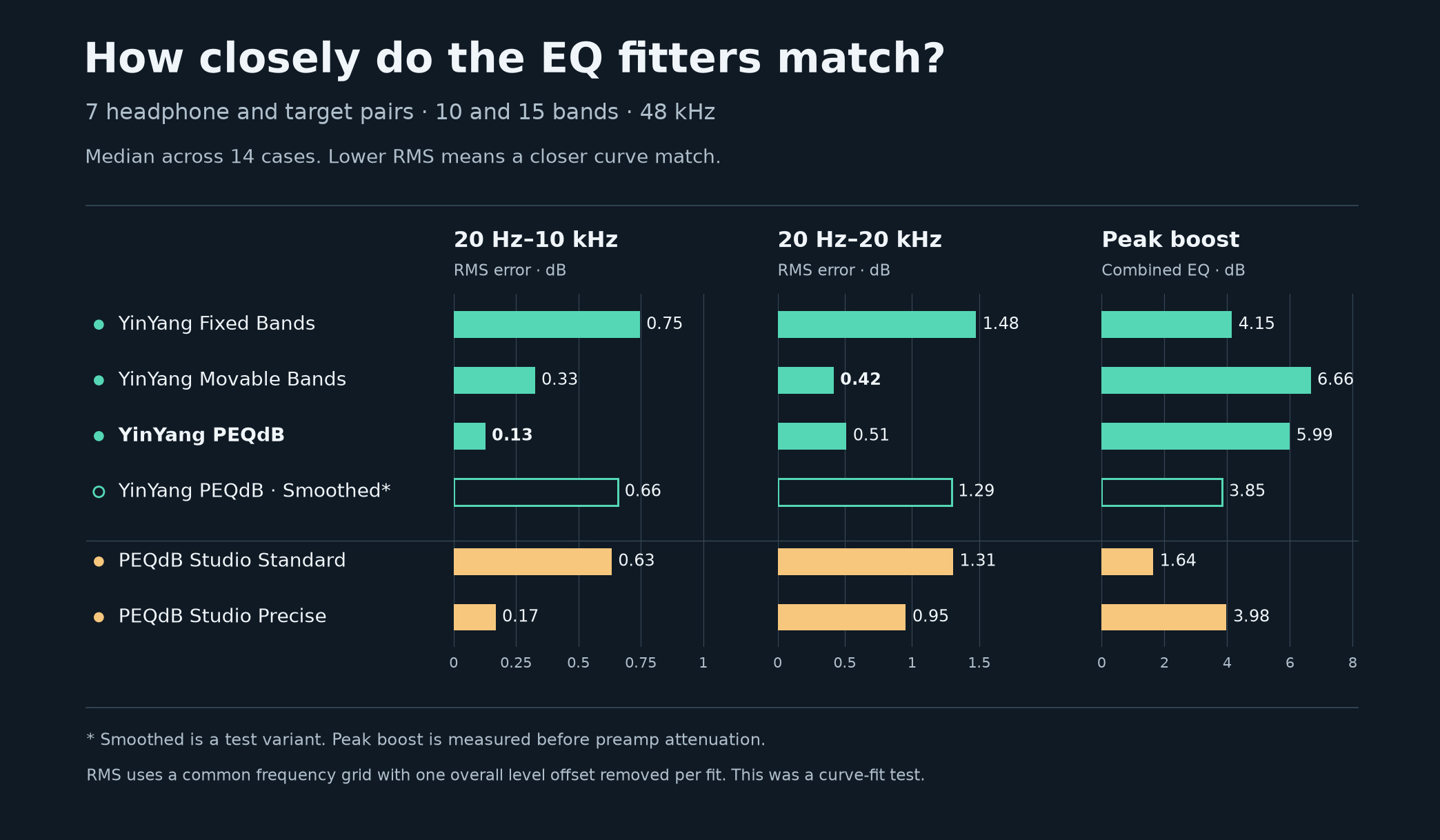
We compared 14 browser-based tools on seven measurement–target pairs at 48 kHz, with four in-ear and three over-ear. Each ranking uses the same pairs at the selected filter limit.
YinYang All-Band Fit led all seven error measures at 10, 15, 20 and 30 bands. Several fits used less peak boost. Choose a fit for your device.
22 configurations from 14 tools at 10 bands. Ranked by RMS to 10 kHz.
| Rank | Fitter | RMS to 10 kHz | RMS to 20 kHz |
|---|---|---|---|
| 1 | YinYang All-Band Fit | 0.161 | 0.191 |
| 2 | YinYang PEQdB Unsmoothed | 0.217 | 0.556 |
| 3 | modernGraphTool Exact match | 0.273 | 0.510 |
| 4 | PEQdB Studio Precise | 0.292 | 0.960 |
| 5 | Squiglink Auto EQ (20 kHz) | 0.371 | 1.246 |
| 6 | Unheard Lab Auto EQ | 0.378 | 1.252 |
| 7 | YinYang Sequential Fit | 0.411 | 0.461 |
| 8 | Tryptify Peaking | 0.516 | 1.440 |
| 9 | Hangout Audio Auto EQ | 0.524 | 1.295 |
| 10 | Tryptify Shelf ends | 0.563 | 1.347 |
| 11 | Audio Discourse Auto EQ | 0.587 | 1.307 |
| 11 | Bedrock Reviews Auto EQ | 0.587 | 1.307 |
| 11 | Boizoff Auto EQ | 0.587 | 1.307 |
| 11 | HiFiEndgame Auto EQ | 0.587 | 1.307 |
| 15 | modernGraphTool Treble-safe | 0.630 | 1.204 |
| 16 | PEQdB Studio Standard | 0.672 | 1.257 |
| 17 | CSI-Zone Auto EQ | 0.697 | 1.843 |
| 17 | Squiglink Auto EQ (6 kHz) | 0.697 | 1.843 |
| 19 | YinYang PEQdB Smoothed | 0.701 | 1.306 |
| 20 | AutoEq.app Custom PEQ | 0.733 | 1.526 |
| 21 | CurveLab Auto PEQ | 0.847 | 0.842 |
| 22 | YinYang Preset Frequencies | 0.927 | 1.645 |
| Loundess PEQ (RootlessJamesDSP fork)Android reference. Fits 30 Hz–6 kHz. Median of 3 active filters. | 1.361 | 2.155 | |
| Before EQ | 2.007 | 3.320 |
RootlessJamesDSP fork, 30 Hz–6 kHz
Only frequencies in this range set the level offset and count toward the error score.
| Band limit | Active filters | RMS error |
|---|---|---|
| 10 bands | 3 | 0.321 dB |
| 15 bands | 3 | 0.321 dB |
| 20 bands | 3 | 0.321 dB |
| 30 bands | 3 | 0.321 dB |
Band budgets tested by tool
Each ranking includes configurations that completed all seven pairs at the selected budget.
- YinYang EQ
- 10, 15, 20, 30 bands
- PEQdB Studio
- 10, 15, 20 bands
- Squiglink
- 10, 15, 20 bands
- Hangout Audio
- 10, 15, 20 bands
- AutoEq.app
- 10, 15, 20, 30 bands
- modernGraphTool
- 10, 15, 20, 30 bands
- Tryptify
- 10, 20 bands
- CurveLab
- 10 bands
- Audio Discourse
- 10, 15, 20 bands
- Bedrock Reviews
- 10, 15, 20 bands
- HiFiEndgame
- 10, 15, 20 bands
- Boizoff
- 10, 15, 20 bands
- Unheard Lab
- 10, 15, 20 bands
- CSI-Zone
- 10, 15, 20 bands
Download per-case scores (CSV)
Search benchmark by headphone or IEM
How to read the scores
- RMS summarizes the size of the differences from the target. Lower is closer. We remove one overall level offset and give equal space to each octave. The same filters are scored in every range.
- Through 10 kHz reduces the influence of upper-treble peaks and dips that can shift with fit and placement. Through 20 kHz includes the full curve. Use the bass and treble scores to see where an average hides an error. Compare the 95th percentile with the worst error to see whether a large miss is isolated.
The score predicts how closely the EQ matches the target on the supplied measurement. On a 711 coupler, measure with EQ off and on before moving the earphone, then repeat after a few reseats. The standard specifies ear simulation from 100 Hz to 10 kHz. IEC 60318-4
What the fitter names mean
- All-Band Fit adjusts every filter’s frequency, boost or cut, and width together. Use it for a close match to a repeatable measurement. Earlier results call it Joint Fit.
- Preset Frequencies uses evenly spaced filter centers on the frequency plot. This gives you a predictable set of frequencies to adjust by hand.
- Sequential Fit adds filters one at a time where the response is still off target. Use it to compare another way of correcting the biggest remaining differences.
- PEQdB · Unsmoothed fits the detailed measurement. Try it when the narrow peaks and dips you want to correct show up consistently in repeat measurements. PEQdB source
- PEQdB · Smoothed softens narrow peaks and dips before fitting. Try it when those features move between measurements. In 14 original comparisons, smoothing used less peak boost in 13 and left more RMS error in all 14.
Settings and versions vary by tool. Identical scores share a rank. The original snapshot is from . All-Band Fit was measured on . The CSV records the date and active filter count for each fit.